
Download BlogAssist – free Mac text‑formatting tool for bloggers
Overview
BlogAssist is a lightweight, trial‑version utility designed specifically for Mac users who write blog posts on a daily basis. Positioned in the Internet software category with a sub‑category of Web → Blogging, the program lives in the system menu and instantly formats any text you have copied to the clipboard. The current version, 2.2.5, was last updated on May 13 2010 and brings performance improvements for Snow Leopard while maintaining compatibility with older Mac OS X releases such as Tiger (10.4) and Leopard (10.5). Even though it’s been in the catalog since 2006, BlogAssist still enjoys a modest but loyal following—61 total downloads to date and a recent spike of two downloads last week, mainly from German users who value its small footprint and English‑only interface.
What makes BlogAssist stand out is its singular focus: it does one thing, and it does it well. By converting raw clipboard content into clean, blog‑ready HTML or Markdown, it eliminates the tedious copy‑paste and manual tag insertion that many writers dread. The app runs as a discreet menu bar item, so you never have to hunt for a bulky window. When you copy text—whether it’s a paragraph from a Word document, a list from a spreadsheet, or a block of code—BlogAssist automatically detects the content type and offers a set of formatting options that match the most popular blogging platforms (WordPress, Blogger, Ghost, and more).
Because BlogAssist is a trial version, users get a fully functional experience for a limited period, after which they can decide whether to purchase the full license. The trial is free to download, secure (signed by the developer), and requires virtually no storage space compared with other Internet utilities. If you’re looking for a simple, reliable way to clean up your clipboard before publishing, BlogAssist is a tool worth trying.
Key Features, Pros & Cons
- Instant clipboard monitoring – formats text as soon as you copy it.
- Multiple output formats – HTML, Markdown, BBCode, and plain text.
- One‑click cleanup – removes hidden characters, extra spaces, and unsupported tags.
- Custom style presets – save your favorite heading hierarchy, list style, and link format.
- Lightweight footprint – less than 5 MB of disk space, ideal for older Macs.
- Snow Leopard optimization – smoother performance on OS X 10.6 and later.
- English‑only interface – clear, concise menus for quick learning.
Pros
- Speed: Real‑time formatting means you never wait for a separate conversion step.
- Simplicity: No complex settings; the menu bar icon provides all essential options.
- Portability: Works on any Mac OS X version from 10.4 to 10.6 without additional plugins.
- Free trial: Full functionality is available during the trial period, allowing honest evaluation.
- Low resource usage: Ideal for older hardware or machines running multiple blogging tools.
Cons
- Mac‑only: No Windows, Linux, Android, or iOS version is available.
- English UI only: Non‑English speakers may need to rely on documentation.
- Last update was in 2010: Future OS releases may eventually drop support.
- Trial limitation: After the trial expires, you must purchase a license to continue using the app.
- Limited advanced features: Power users looking for batch processing will need a more robust solution.
BlogAssist delivers exactly what its description promises: a fast, reliable way to clean up copied text before publishing. The pros far outweigh the cons for most casual bloggers, especially those who value a tiny footprint and zero‑cost trial. While the lack of a Windows version limits its audience, Mac‑centric writers will find it an indispensable addition to their workflow.
Installation, Setup, and First Use
Getting BlogAssist up and running is a straightforward process that takes less than five minutes, even for users who are not technically inclined. Follow these steps to install and start formatting your clipboard content immediately:
Step‑by‑step installation
- Download the installer: Click the “Download BlogAssist” button on the product page. The file is a signed
.dmgpackage, ensuring a secure download. - Open the disk image: Double‑click the
.dmgfile to mount it. Drag the BlogAssist icon to the Applications folder as prompted. - Launch the app: Navigate to Applications → BlogAssist and double‑click. macOS may warn you about an app from an unidentified developer; click “Open” to proceed, as the software is signed.
- Grant accessibility permissions: The first launch triggers a system dialog asking for permission to monitor the clipboard. Approve this request in System Preferences → Security & Privacy → Privacy → Accessibility. This step is essential for real‑time formatting.
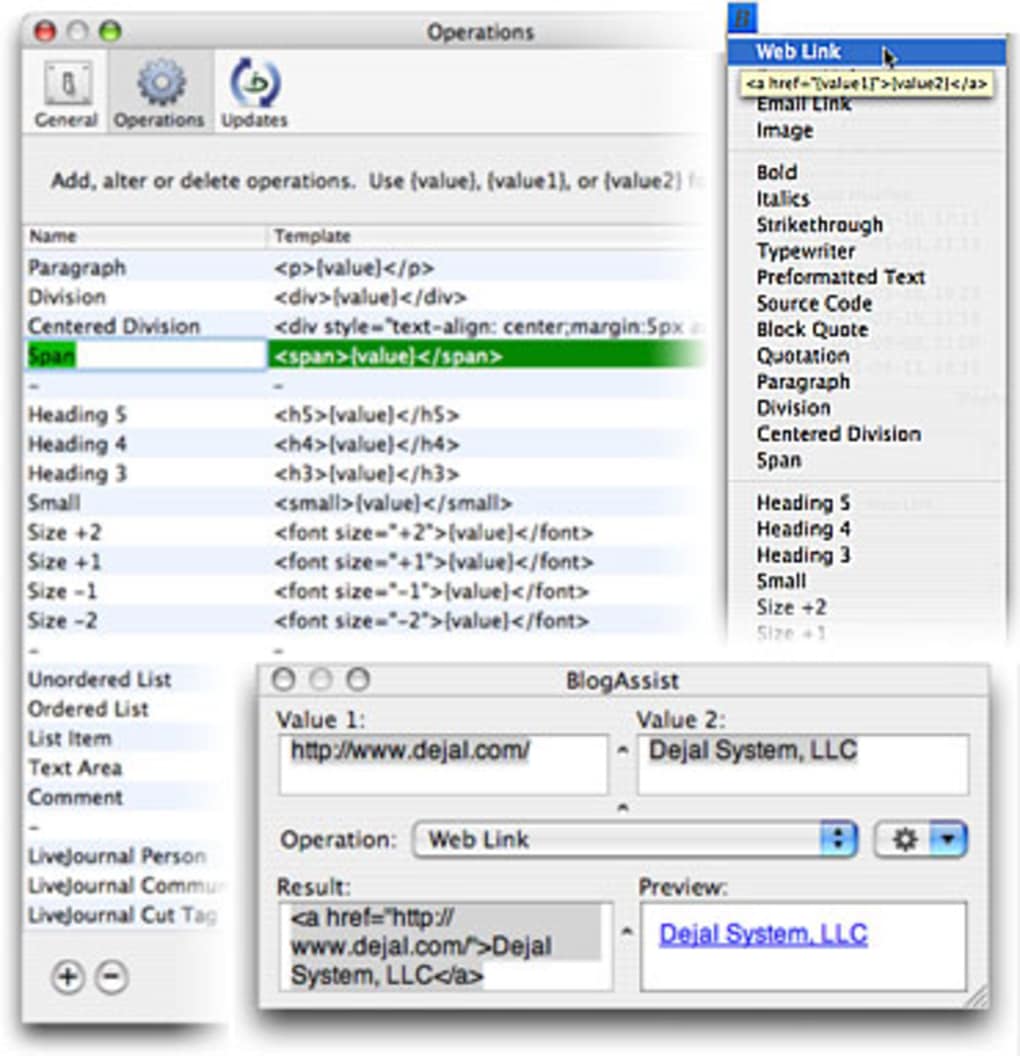
- Configure preferences (optional): Click the menu bar icon (a small pen) and select “Preferences.” Here you can set default output format, enable or disable automatic formatting, and create custom style presets.
First‑time usage
Once installed, BlogAssist lives quietly in your menu bar. To format text, simply copy any block of text as you normally would (⌘ C). The app detects the copy event, analyzes the content, and presents a tiny popup menu with formatting options such as “Convert to HTML,” “Convert to Markdown,” or “Strip Formatting.” Selecting an option instantly replaces the clipboard contents with the newly formatted version. You can then paste (⌘ V) directly into your blog editor, and the text will appear clean and ready for publishing.
For power users, the “Presets” feature lets you save a preferred heading hierarchy, list style, and link handling. Access your presets from the same popup menu, and BlogAssist will apply them automatically, saving you minutes of repetitive editing. Because the program runs in the background, you’ll never need to reopen a window or navigate through menus—everything is accessible with a single click.
Compatibility, Updates, FAQ & Final Verdict
BlogAssist is built exclusively for macOS. The latest version (2.2.5) officially supports Mac OS X 10.4 Tiger, 10.5 Leopard, and 10.6 Snow Leopard. The developer announced that future non‑bug‑fix releases will require at least OS X 10.5, meaning this may be the final version that runs on Tiger. Users on newer macOS releases (10.7 Lion and beyond) have reported that the app continues to function, but no official support is guaranteed.
The software receives occasional security updates, though the last official patch was released in 2010. Since the codebase is stable and the core functionality is simple, the risk of vulnerabilities is low. Nonetheless, always download the installer from the official source to ensure a secure, unmodified version.
Frequently Asked Questions
-
Is BlogAssist really free?
Yes, the trial version can be downloaded and used free of charge for a limited time. After the trial expires, you’ll need to purchase a license to continue using the full feature set.
-
Can BlogAssist format both HTML and Markdown?
Absolutely. The popup menu lets you choose between HTML, Markdown, BBCode, or plain text, making it versatile for any blogging platform.
-
Will BlogAssist work on the latest macOS (Ventura, Monterey)?
While the developer hasn’t officially tested it on macOS 12/13, many users report that it still runs because it relies on basic clipboard APIs that haven’t changed dramatically.
-
How much disk space does BlogAssist occupy?
The entire application is under 5 MB, making it one of the smallest utilities in the Internet‑software category.
-
Is there a way to customize the formatting presets?
Yes, the Preferences window includes a “Presets” tab where you can define your own heading levels, list bullets, and link styles. These presets are saved locally and can be exported for backup.
Conclusion & Call to Action
For Mac‑based bloggers who need a quick, reliable way to clean up copied text, BlogAssist delivers exactly what its name promises. Its tiny footprint, real‑time clipboard monitoring, and support for multiple output formats make it a valuable addition to any writer’s toolkit. While the lack of a Windows version and the fact that the last major update was in 2010 may give some pause, the app’s core functionality remains solid and useful for everyday blogging tasks.
If you’re ready to streamline your publishing workflow, download BlogAssist today. The free trial lets you test every feature without commitment, and the secure installer ensures a safe installation on any compatible Mac. Upgrade to the full license once you’ve experienced the time‑saving benefits, and enjoy a clutter‑free blogging experience every time you paste.







